Searching for an AP Invoice
-
Select
 AP Invoices on the Side Menu. See Side Menu.
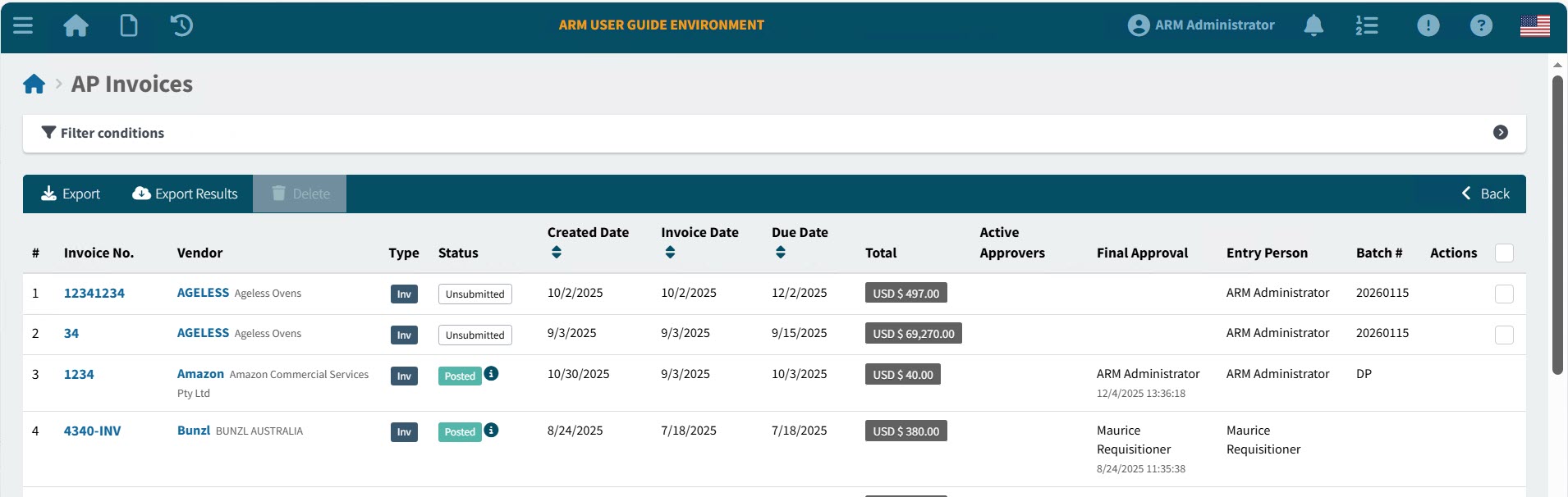
The AP Invoices page opens.
-
Adjust the filter conditions.
See Details
-
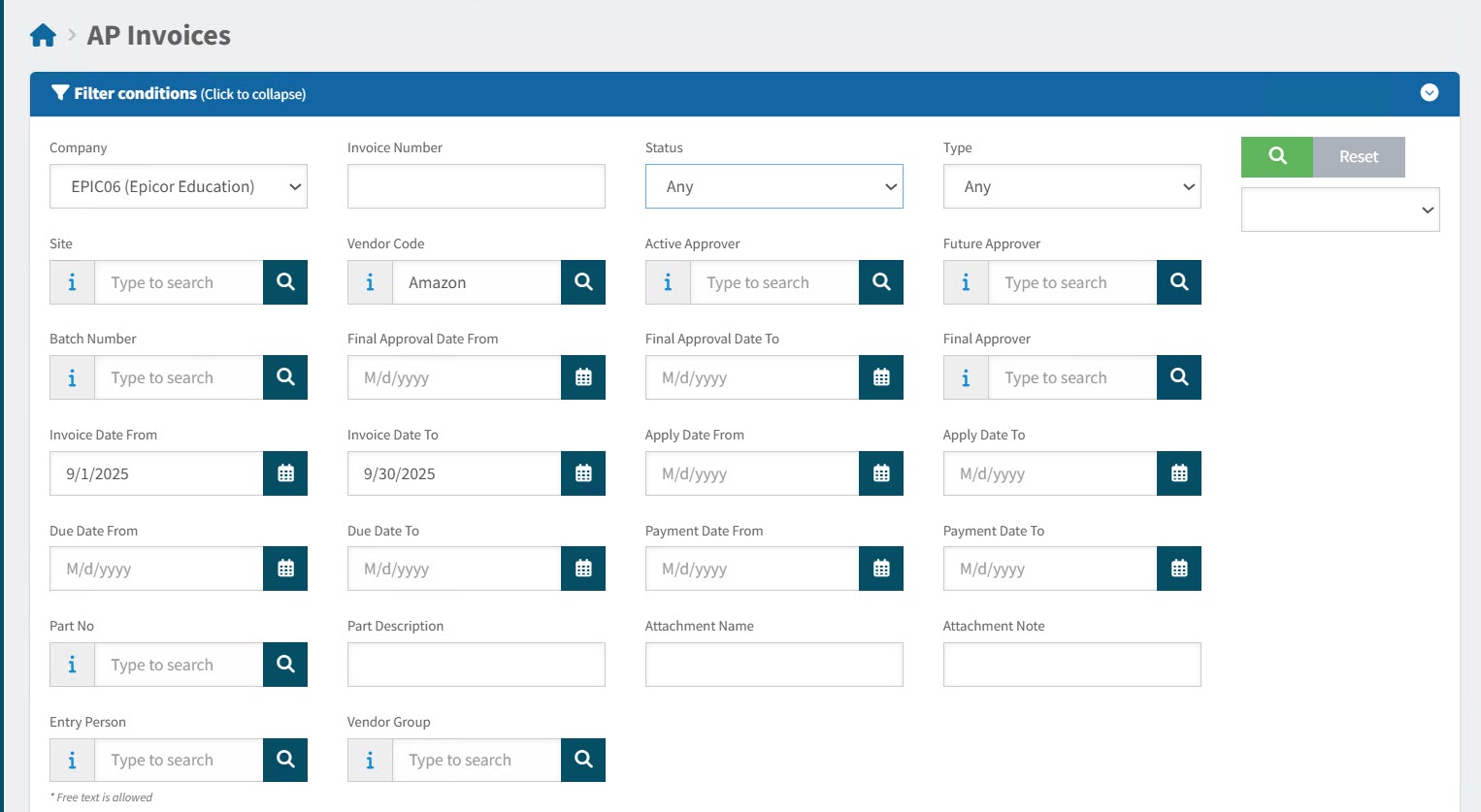
Expand the filter conditions in the top section of the page to search for a specific AP Invoice or to narrow your search.
View filter conditions
-
Enter values in the edit boxes, or select from the search boxes. See the filter conditions, below.
Filter conditions
Company Select a Company from the drop-down list. The current logged-in user only has access to Companies that include their accessible Sites (and Sites are accessible based on the user’s Assigned Locations).
Invoice Number Enter an Invoice Number (or part of the number) to match on.
Status Select one of the following status values from the drop-down list:
-
Any
-
Any (Workflow)
(This includes: Pending Revision, Review in Progress, Suspended, Rejected, Unsubmitted, Approval in Progress)
-
Pending Revision
-
Review in Progress
-
Paid
-
Posted
-
Suspended
-
Rejected
-
Unsubmitted
-
Submitted
-
Approval in Progress
-
Approved
Type Select one of the following types from the drop-down list:
-
Any
-
Invoice
-
Debit Memo
Site Only show AP Invoices belonging to the selected Site. The current logged-in user only has access to Sites that include the user’s Assigned Locations.
Vendor Code Only show AP Invoices for this Vendor. Vendors are limited to those belonging to the currently logged-in user’s Vendor Groups/the selected Vendor Group.
Active Approver Select a user from the drop-down list. Filters for this user as an active approver for the AP Invoice.
Future Approver Select a user from the drop-down list. Filters for this user as a future approver for the AP Invoice.
Batch Number Filter for AP Invoices with this batch number.
Final Approval Date From Final Approval Date between Final Approval Date and Final Approval Date To.
Final Approval Date To Final Approval Date between Final Approval Date and Final Approval Date To.
Final Approver The name of the final approver.
Invoice Date From Invoice Date between Invoice Date From and Invoice Date To.
Invoice Date To Invoice Date between Invoice Date From and Invoice Date To.
Apply Date From Apply Date between Apply Date From and Apply Date To.
Apply Date To Apply Date between Apply Date From and Apply Date To.
Due Date From Due Date between Due Date From and Due Date To.
Due Date To Due Date between Due Date From and Due Date To.
Payment Date From Payment Date between Payment Date From and Payment Date To.
Payment Date To Payment Date between Payment Date From and Payment Date To.
Part No Invoice lines contain this part number.
Part Description Invoice lines contain a part with this part description.
Attachment Name Name of an attachment file.
Attachment Note Name of an attached note.
Entry Person The person who captured the invoice.
Vendor Group Filter on AP Invoices for Vendors belonging to the selected Vendor Group. The currently logged-in user’s Vendor Groups are available.
-
AP Invoices that match the filter conditions are listed in the grid.
-
-
To sort the results, click on one or the sort column headers: Created Date, Invoice Date or Due Date. Click once to sort from most recent to oldest, or click twice to sort from oldest to most recent.