Terms Codes
Terms Codes are maintained in Kinetic’s Purchasing Terms Maintenance, then integrated from Kinetic to ARM.
Permissions
You require a role with the Edit Terms Code Mappings permission to edit Terms Codes mappings in Terms Codes maintenance.
The other permissions relating to Terms Codes are:
-
Edit AP Invoice Terms Code, which allows the user to edit Terms Codes on an AP invoice.
-
Edit Requisitions Terms Code, which allows the user to edit Terms Codes on a Requisition.
-
Edit Proforma Order Terms Code, which allows the user to edit the Terms Codes on a Proforma Order.
See Permissions in ARM.
To view Terms Codes, and edit the Custom Mappings:
-
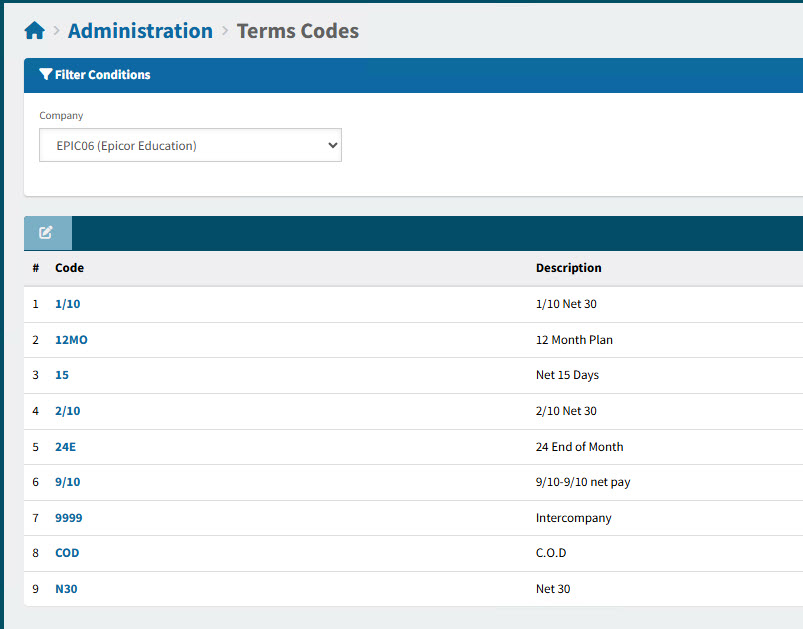
Select the Terms Code menu item on the Administration Page.
The Terms Codes from Kinetic are displayed on the page.
-
Filter on your Company from the drop-down list.
-
Click on a Code to view the Terms Code in the Administration > Terms Codes > [Code] page.
Terms Codes Mapping
In ARM, you can add Custom Mappings to a Terms Code.
During AP Automation, when a Draft Invoice is Generated, a custom mapping may be matched to a potential Terms Code on the AP Invoice PDF. The Terms Code that this maps to is added to the drop-down list for the user to select.
For example: If the Terms Code Net 15 Days has a Custom Mapping with a Mapping Code of Term 15, then if Term 15 is read from the AP Invoice PDF by the OCR reader, Terms Code Net 15 Days is offered as an option to select during the editing step.