Exporting Invoice Files
You can export a CSV file containing invoices where the capture date or the invoice date (as selected) falls within a selected period.
-
Click
 Export on the menu bar.
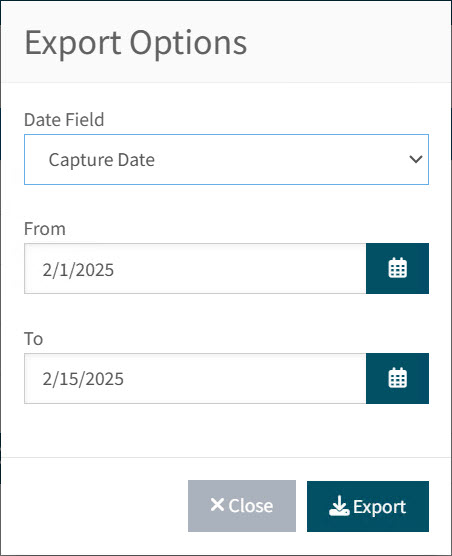
This opens the Export Options pop-up dialogue.
-
Select Capture Date or Invoice Date from the Date Field drop-down list.
-
Select a From date.
-
Select a To date.
-
Click the
Export button.A CSV file is generated, containing the draft invoices where either the Capture Date or the Invoice Date falls between the selected dates. The file is named: "Invoice_Automation_Dashboard_Exported_[YYYY-MM-DD]" and is saved to your Downloads folder.
The export file is not limited to what appears in the search results grid. -
Click the Close button to close the Export Options dialog.