GL Account Mask Sequence
The GL Account Mask Sequence in Global Settings defines the sequence used to create GL Account Codes from GL Account Masks.
For example, the GL Account Mask Sequence is used to create the default GL Account Code on a non-inventory item on a Requisition.
|
Exception: If the Requester Segments Override Defaults is selected for a Requester Group, then the Requester Group’s Default GL Account for the applicable company is used instead of the GL Account Code created by the GL Account Mask Sequence. This is superseded by the individual Requester’s Default GL Account for the applicable company, if their Requester Segments Override Defaults is selected. For GL Account defaulting on AP invoice creation, the Requester and Requester Group Default GL Account is ignored. |
Default GL Logic in ARM
ARM uses the default GL logic to create GL Account Codes from the GL Account Mask, as described above.
The logic is applied in the creation of GL Account Codes for non-inventory items that are added to a document (such as a non-inventory item added to a Template).
Inventory items also use this logic if the Company Setting Use ARM’s GL defaulting logic on inventory items is set to Yes. If the setting is No, then ARM uses the same logic as Kinetic, using GL Controls to create default GL Account Codes.
| Warning: If the setting Use ARM’s GL defaulting logic on inventory items is set to Yes, you need to update Kinetic’s Posting Rules to align with ARM. |
Example
An example value for GL Account Mask Sequence is Vendor,User,Catalogue Item Location,Category,Location,Inventory Item Posting Code,Natural Account Options.
See GL Account Mask Sequence Setting
|
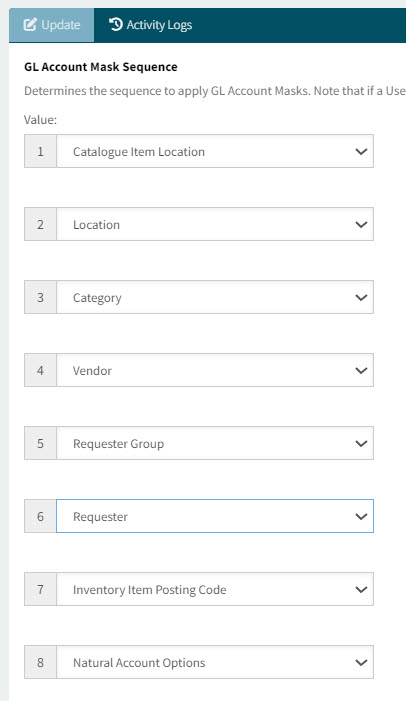
Using the above example sequence, the GL Account Code is derived using the Vendor, Catalogue Item Location, current User, and so on, for a particular requisition line.
See Details
| GL Account Mask in this instance | ||
|---|---|---|
Vendor |
ABC |
____-__-20 |
User |
J Smith |
8100-__-__ |
Catalogue Item Location |
001MP |
1215-00-00 |
Category |
ALUM |
____-__-01 |
Location |
EPIC06-EVN |
____-02-__ |
Inventory Item Posting Code |
____-_-_ |
|
Natural Account Options |
____-_-_ |
The resulting GL Account Code here is: 8100-00-20.
| The resulting GL Account Code must be valid. Validation occurs either when a Requisition is submitted (On Submit) or during the approval process (First Approval or Final Approval), or on PO Creation, as defined in the GL Account And Reference Code Validation Option in Document Types Configuration for the Company. See Document Type Configurations. |