Integration Jobs
Select an Integration Agent Name to open the jobs for that agent.
The jobs are listed in a grid.
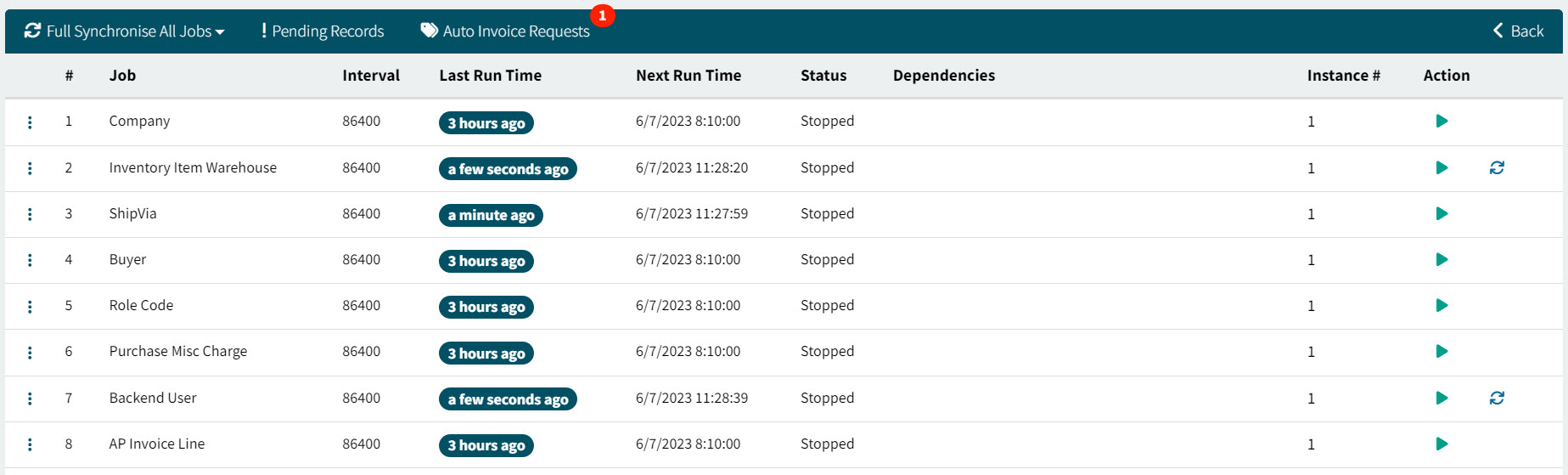
Each job has the following:
-
Job (number and name)
-
Interval
-
Last Run Time
-
Next Run Time
-
Status
-
Dependencies
-
Instance #
-
Action
-
 Run the Job Now.
 -
 Request Full Data Sync in Company.
Note that full synchronization on some jobs can be time intensive and will block other integrations. To continue, select Yes at the confirmation pop-dialog.
-
 Cancel Full Data Sync.
Note that cancelling full synchronization will also bypass any PENDING changes to be brought into ARM from the backend ERP. To continue, select Yes at the confirmation pop-dialog.
-
-
Select the
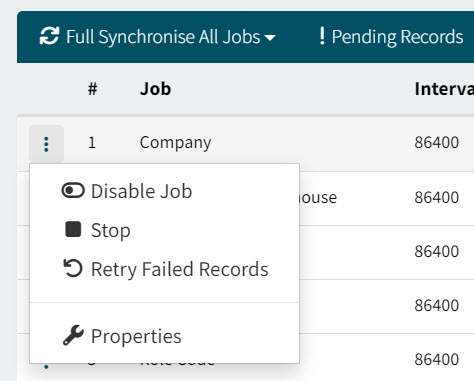
 menu button to the left of a job and select a menu option to:
-
Disable the job (Disable Job)
-
Stop the job (Stop)
-
Retry failed records (Retry Failed Records)
-
Configure the job properties (Properties)
-
Configuring a Job’s Properties
-
Select Properties from the job’s menu.
-
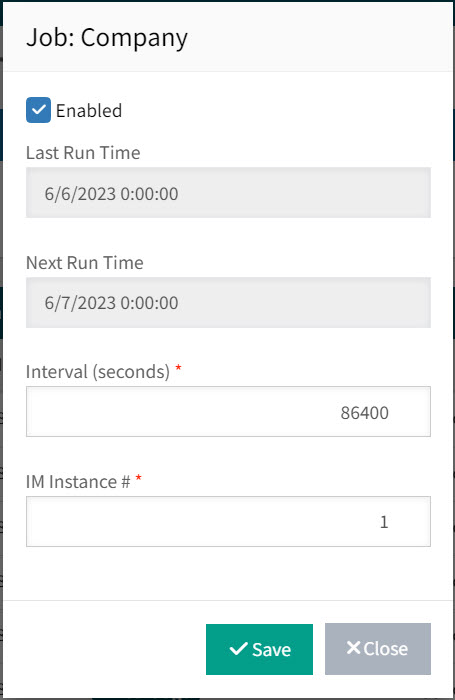
Update any of the configurable Properties, as required. Then Save.
Job Properties
|
| Enabled |
Deselect to disable the job from integration processing. |
| Last Run Time |
Displays the last date and time for the job. |
| Next Run Time |
Displays the next date and time for the job. |
| Interval (seconds) |
The job runs at every interval. |
| IM Instance # |
The integration instance number for the selected job. |
If multiple instances are required within an Agent for specific jobs, pause the Agent before changing this value. Any alternate BIL ports need to be configured beforehand using the BIL Configuration Wizard.
List of Jobs
Here are some of the job descriptions and dependencies:
| # | Job | Description | Dependencies |
|---|---|---|---|
1 |
Company |
Integrates Company details for the company specified when BIL9 was installed. |
|
2 |
Inventory Item Warehouse |
Integrates data about which warehouse the Part exists in. |
|
3 |
ShipVia |
Integrates Ship Via data that has been configured in Kinetic |
. |
4 |
Buyer |
Integrates the Buyers that have been configured in Kinetic. This job is disabled when Intercompany GL Global Setting is active. |
|
5 |
Role Code |
Integrates User Role information. |
|
6 |
Purchase Misc Charge |
This job looks at the table, gets the data that needs to be integrated into ERP back end and uses “transaction processor jobs”, each with specific logic for the type of the transaction to send the data to the back end. |
|
7 |
Backend User |
||
8 |
AP Invoice Line |
Integrates AP Invoice data from Kinetic. |
|
9 |
PO Suggestion |
Integrates PO Suggestions from Material Management> Purchase Management> New PO Suggestions. |
|
10 |
Site |
Integrates Site information from Kinetic (site code and name, address details, tax information). |
|
11 |
Alternate UOM: Part-specific |
Integrates Part-Specific Alternate UOMs that have been configured in Kinetic |
Company, UOM, Inventory Item |
12 |
EDI Job |
Sends Electronic Data Interchange files to the relevant EDI partner. Only works for Purchase Orders created using Punchout, the EDI URL is defined on the Punchout maintenance page of ARM. |
|
13 |
OCR Scan |
For AP Automation: The optical character recognition in Precise Smart Invoice Capture (SIC) |
|
14 |
OCR Retry |
For AP Automation: The optical character recognition in Precise Smart Invoice Capture (SIC) - retry |
|
15 |
Sync Invoiced Receipts From Backend |
Reads the invoice line data and populates the ‘InvoicedReceipt’ table. This is to ensure that when ARM is connected to Kinetic, receipts already invoice in Kinetic cannot be selected in ARM. This job should be turned on and run during the implementation of ARM, and then turned off. The job may only be run when the Global Setting for Enable Invoiced Receipt Sync is enabled. |
|
16 |
Purchase Order Email Queue Processing |
||
17 |
Vendor Verification |
Periodically loads vendor verification data from the OCR Service. |
|
18 |
Manufacturer |
||
19 |
Customer |
||
20 |
Internal Part |
||
21 |
Earliest Apply Date |
||
22 |
UOM Class |
||
23 |
Log Data Retention |
||
24 |
Customer Part |
||
25 |
Reset Draft Invoice Notification Tracking |
||
26 |
Vendor |
Integrates Vendor details |
Company |
27 |
UOM |
Integrates the UOMs that are associated with the UOMClass’Counted Units |
Company |
28 |
Location |
Integrates Warehouse details, including the site that the warehouse belongs to. |
Company |
29 |
Inventory Group |
Integrates Product Groups. |
Company |
30 |
Tax Code |
Integrates Tax Liabilities |
Company |
31 |
Currency |
Integrates all active currencies. |
Company |
32 |
GL Account Definition |
Integrates Chart of Account Structure from GL > Setup > Chart of Accounts. |
Company |
33 |
GL Period |
Integrates Fiscal Year periods from GL > Setup > Fiscal Calendar. |
Company |
34 |
GL Reference Type |
Integrates GL COA Reference Types from GL > Setup > GL COA Reference Types. |
Company |
35 |
GL Segment Value |
Company |
|
36 |
GL Account Budget |
Company, GL Period |
|
37 |
GL Period Balance |
Integrates Account Segment Values that are associated with a GL Reference Type from GL > Setup > Account Segment Values > Segment = GL Reference Type. |
Company |
38 |
FOB |
Integrates FOB (Free-on-board) data from Sales Management > Order Management > Setup > FOB (required setup for European countries) |
Company |
39 |
Part Class |
Integrates Part Class data from Material Management > Inventory Management > Setup > Part Class |
Company |
40 |
Project |
Integrates Project data from Production Management > Job Management > General Operation > Project Entry |
Company |
41 |
Manufacturing Job |
Integrates Job data from Production Management > Job Management > General Operations > Job Entry |
Company, Project |
42 |
Country |
Integrates Country data |
Company |
43 |
Payment Method |
Integrates Accounts Payable payment methods. |
Company |
44 |
Vendor Group |
Integrates Supplier Group data from Kinetic > Material Management > Purchase Management > Setup > Supplier Group. |
Company |
45 |
GL Book |
Integrates the GL Book values from GL> Setup> Book IMPORTANT: The new GL Book job touches on a series of GL control codes which will then trigger the refresh of related parts and/or part classes. |
Company |
46 |
Create E9 Transactions |
There are many separate integration jobs which are “transaction generators”. The transaction generators read data from ARM and put the (transformed) integration data into Transaction table. |
Company |
47 |
Approved Vendor |
Integrates Approved Vendor data from Kinetic (applicable with Supplier Pricing configuration on Parts). |
Company |
48 |
HS Commodity |
||
49 |
AP Invoice |
Integrates AP Invoice data from Kinetic. |
Vendor |
50 |
Currency Exchange Rate |
Integrates all the current exchange rates that have been configured in Kinetic |
Currency |
51 |
GL Account |
Integrates GL Accounts |
Company, GL Account Definition |
52 |
Inventory Item |
Integrates all valid Kinetic Parts |
Company, UOM, Location, Inventory Group, Part Class |
53 |
New Job Material Request |
Integrates New Job Material Requests generated against Requisitions (this process must occur before the Purchase Order can integrate). |
Manufacturing Job |
54 |
Transfer Request |
Integrates Transfer Orders (TO’s created in POS to Kinetic, Receipts between systems) |
Company, Create E9 Transaction |
55 |
GL Segment Option |
Integrates GL Segment Options (Entry Control) for Natural Accounts |
GL Account |
56 |
Alternate UOM: Standard |
Integrates Alternate UOMs that have been configured in Kinetic |
Company, UOM, Inventory Item |
57 |
Vendor Quote |
Integrates Supplier Price List data from Material Management > Purchase Management > Setup > Supplier Price List |
Company, Vendor, Currency, Inventory Item |
58 |
Vendor SKU |
Integrates Supplier Price List Part data from Material Management > Purchase Management > Setup > Supplier Price List > Supplier Parts |
Company, Vendor, Currency, Inventory Item |
59 |
Purchase Order |
Integrates Purchase Order data (PO’s created in POS to Kinetic, Receipts between systems) |
Company, New Job Material Request |
60 |
Auto Invoice Request |
This job waits for PO receipts to be integrated into Kinetic and then proceeds to create AP receipt lines from the integrated data. |
Purchase Order |