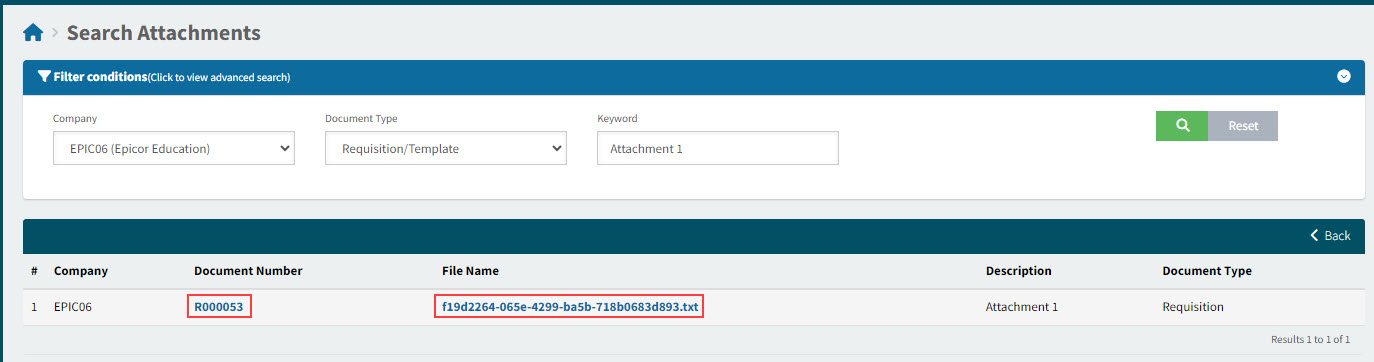
Search Attachments
Use this page to search for attachments in any of the following document types:
-
Requisition/Template
-
ProForma Order
-
Purchase Order.
The search is company-wide, and you can search using a Keyword.
Permissions
You require a role with the Search Attachments permission to view this page. See Permissions in ARM.
-
Select Search Attachments from the Side menu. See Side Menu.
In the Search Attachments page:
-
Set the filter conditions.
View filter conditions

-
Select the Company.
-
Select the Document type (Requisition/Template, ProForma Order, or Purchase Order).
-
Enter a Keyword which contains all or part of the attachment’s Description, File Name, or Document Number.
If you are unsure of the attachment description, leave the Keyword blank.
-
-
Select Search
 .
.
The matching attachments are returned in the results.
See grid details
| Company |
The Company the attachment’s document belongs to. |
| Document Number |
This is the document that has this as an attachment. Click on the Document Number to open the document, for context. You can download the attachment(s) from the document. |
| File Name |
The attachment’s file name. Click on the File Name to open the attachment. |
| Description |
The description that was added when the attachment was uploaded. |
| Document Type |
The type of document that the attachment belongs to, for example, Requisition. |
-
To open an attachment, select the File Name, then select the file from the Recent Downloads list.
-
To go to the linked document, select the Document Number.