Vendor Groups
Permissions
You require a role with the Maintain Vendors permission to access Vendor Groups maintenance. See Permissions in ARM.
ARM Administrators use Vendor Groups to limit which Vendors an individual User can select. See Maintaining Users, in the Information tab section.
You can maintain additional fields in ARM, as described below.
Maintaining Vendor Groups
-
Select the Vendor Groups menu item on the Administration Page. See Administration Page.
The Vendor Groups page displays the list of Vendor Groups integrated into ARM from Kinetic’s Supplier Groups.
See Vendor Groups page
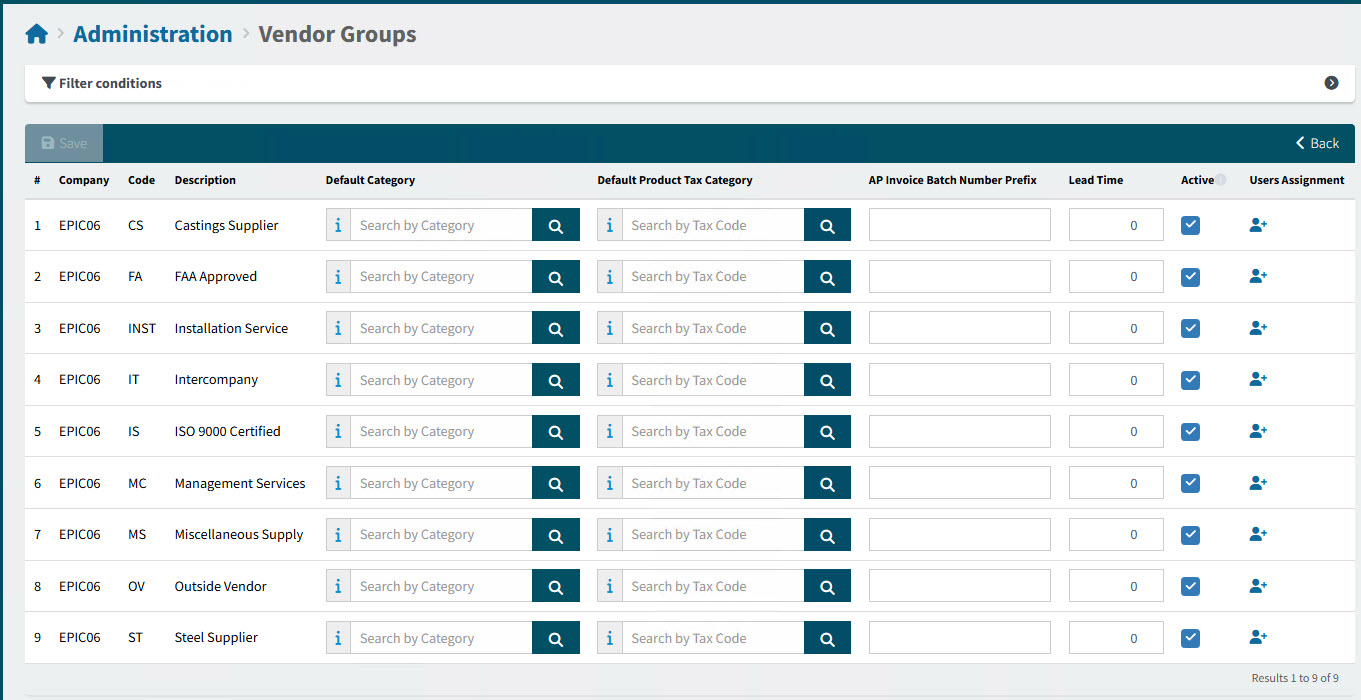
-
Update the Vendor Group fields, as required.
Default Category Optionally enter a Default Category, which is used in the default logic for the Category.
Default Product Tax Category (Optional)
AP Invoice Batch Number Prefix Optionally enter a two-character prefix. This may be used as the prefix for the system-generated, auto-incrementing Batch Number for AP Invoice.
The prefix used, in order of precedence and availability, is from the User, Vendor, Vendor Group, or Company for the AP Invoice.
Lead Time The Lead Time (in days) may affect how Due Date for Requisitions is calculated.
Active If this check box is cleared, the Vendor Group is inactive. This Vendor Group and all its associated Vendors will be excluded from Vendor Group and Vendor search screen results.
User Assignment Use this feature to manage user access. See User Assignment.
-
Select Save.