Licensing
License details are provided during installation.
Maintaining Licensing
You can update the license details, for example if you need extra licenses.
Permissions
You require a role with the Maintain Settings permission to access Licensing.
See Permissions in ARM.
|
-
Select the Licensing menu item on the Administration Page. See Administration Page.
The Administration > Current License Information page opens.
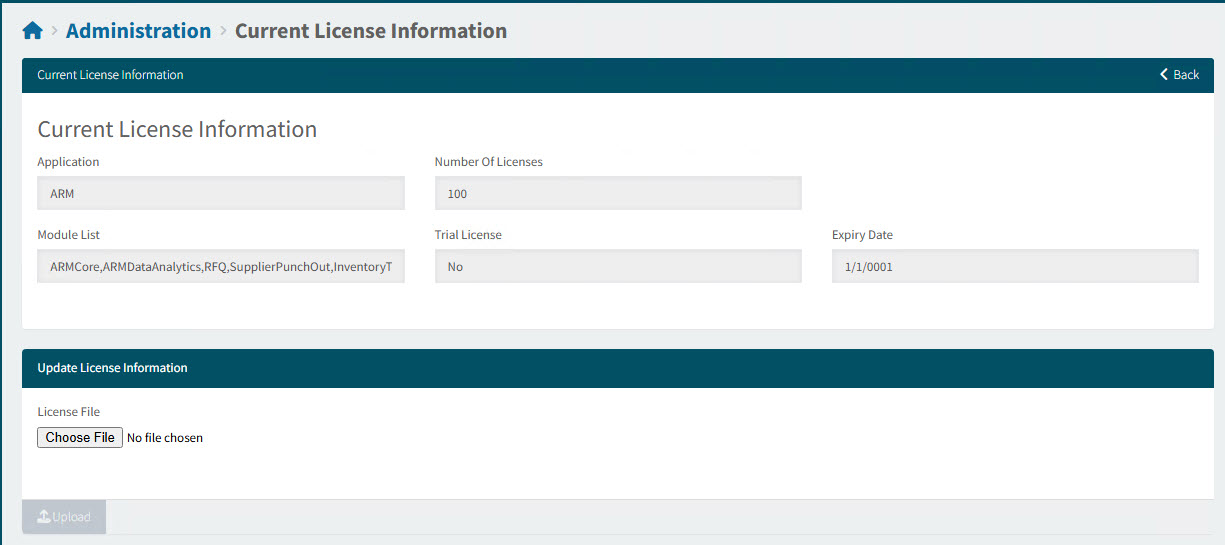
| Application |
The name of the application system. |
||
| Number of Licenses |
The number of active users who can use modules listed under the license agreement (see Module List).
|
||
| Module List |
The names of the modules that have been licensed in terms of the current license agreement. For example: ARMCore, ARMDataAnalytics, RFQ, SupplierPunchOut, InventoryTransfers, APACore, APADataAnalytics. |
||
| Trial License |
If Yes, then ARM is being used on a trial basis. |
||
| Expiry Date |
The date the current licenses will expire. |
To update the license agreement:
-
In the Update License Information section, click Choose File.
-
Type the license key in the License Key field.
-
Click Upload.
-
Click Back.