User Delegation
Some roles can be delegated to another user. This is controlled by a setting for the role (on the Roles page), called Can Delegate. If a role can be delegated, and the user has this role (User Detail, Roles tab sheet), then it will appear in their Roles Delegation list.
Delegation involves two users:
-
The delegate: The user who takes on the role.
-
The delegator: The user whose role is taken on.
The delegation can be performed by the delegator, from the User Delegation page, accessed from their dashboard, or by an Administrator, on the User Detail page for the delegator.
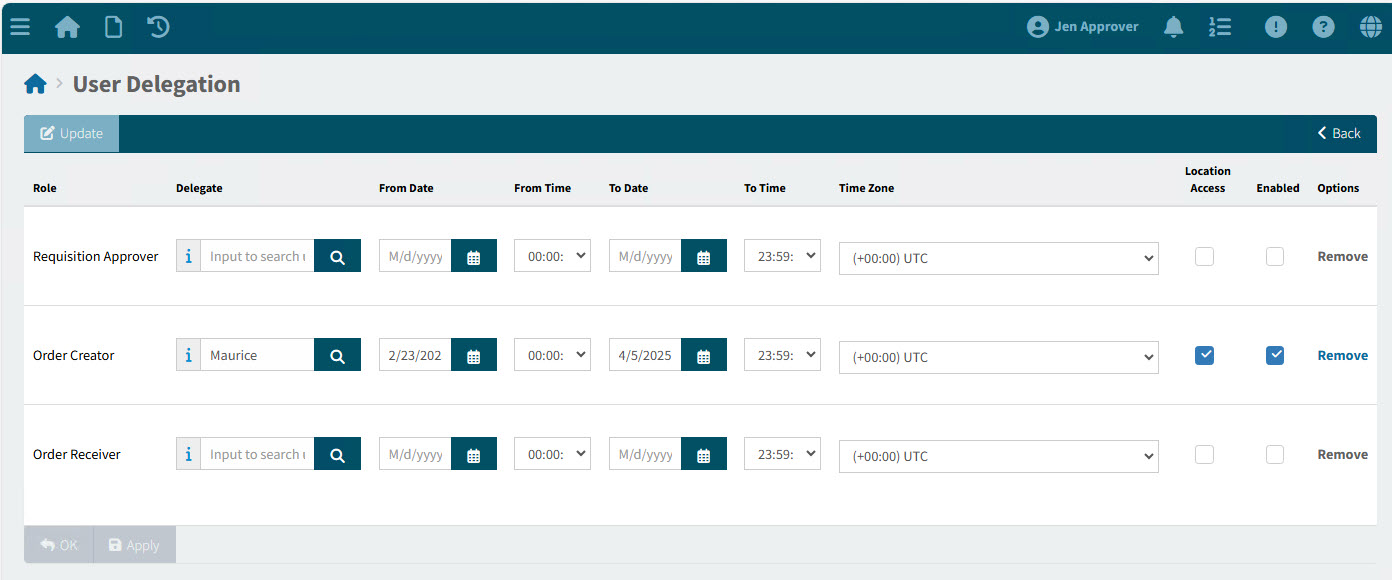
See an example on the User Delegation page:
| If there are no roles to delegate for this user, there is a label: 'You have no Roles Assigned that can be Delegated'. |
-
The user will receive approval notifications even while that role is delegated, if the check box Receive approval notification whilst own approval role is delegated is selected.
To delegate a role:
-
Click into the Delegate box, then select a user from the drop-down list.
-
If you are delegating from a specific date, select a From Date. If you are delegating up to a specific date, select a To Date. Otherwise, leave these blank to delegate for an indefinite period.
-
Select Location Access if you want the Delegate to have the Delegator’s locations added to their list of Assigned Locations.
-
To enable the delegation, select Enable.
-
Save the changes.
Here are some examples of roles that may appear in a user’s Roles Delegation list:
-
Catalogue Requisitioner
-
Requisition Approver
-
Order Creator
-
Order Receiver
-
AP Invoice Approver
-
Order Creator
Here are some guidelines relating to roles delegation:
|