AP Payments
Permissions
You require a role with the Maintain Settings permission to access AP Payment Methods.
See Permissions in ARM.
Maintaining AP Payment Methods
AP Payment Methods are maintained in Kinetic, then integrated from Kinetic into ARM.
If Enable AP Payment Method is enabled in ARM Global Settings, you can select Pre-paid on a Requisition and then select the Payment Type from a list of AP Payment Methods available to you and enter a Payment Reference if this is required. See New Requisition.
The payment method and reference are recorded against ARM transactions.
To view or maintain AP Payment Methods:
-
Select the AP Payments menu item on the Administration Page. See Administration Page.
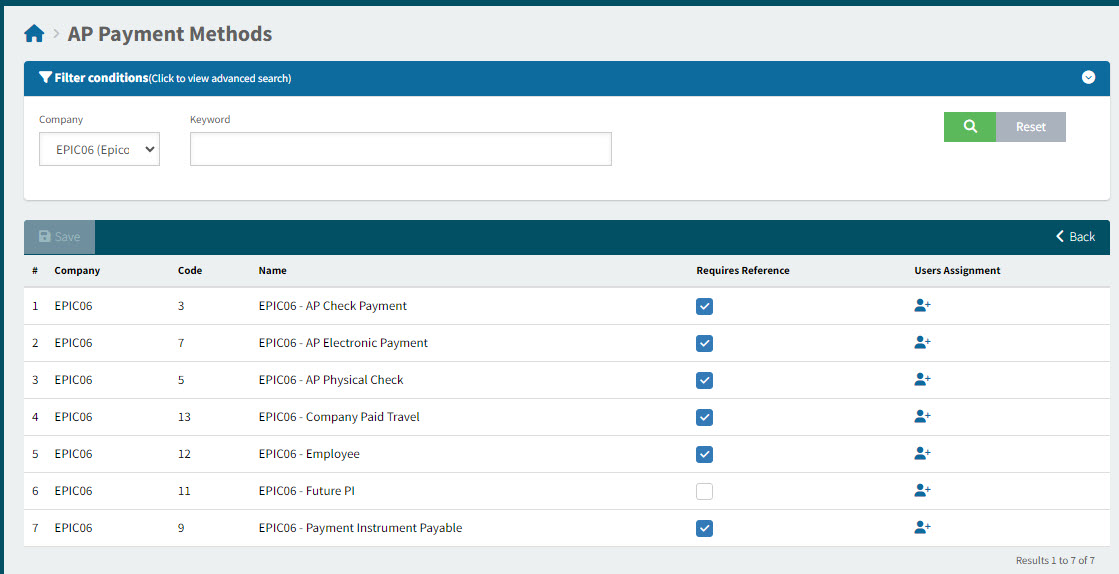
The AP Payment Methods from Kinetic display on the screen.
-
To set a Payment Reference requirement for a Payment Method, select Requires Reference for that Payment Method.
-
To assign a Payment Method to Users, select User Assignment for that Payment Method and assign to selected users (or assign to all users). See how to use User Assignment: in User Assignment. Alternatively, you can select which AP Payment Methods are available to a user from the Users > User Detail page. See Maintaining Users (Information tab).