Integration Agents
Create one or more integration agents to manage data integration between assigned companies and Kinetic and other providers.
Each integration agent has a full list of jobs.
Use Company Mapping to map the various companies in ARM to the different integration agents.
Each company can be mapped to a single integration agent, and a single integration agent can be mapped to multiple companies.
Configure Integration Agent
-
To configure an integration agent, click the Configure
 icon for the agent, on the Integration page.
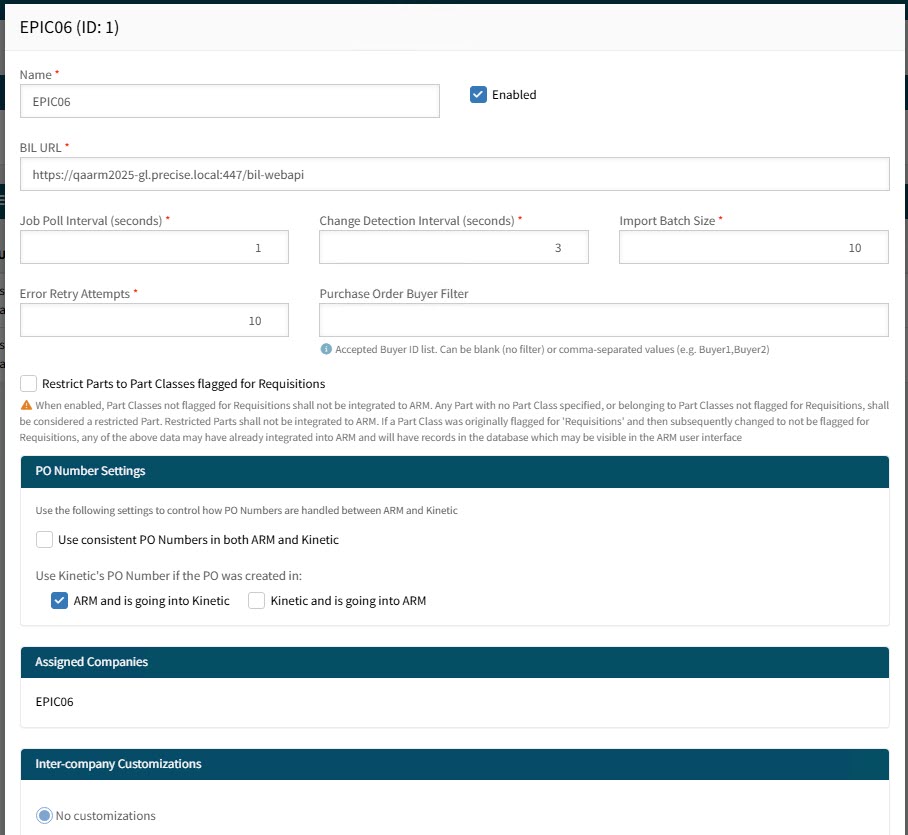
This opens the Integration Agent configuration settings page.
-
If you are a System Administrator you may update the following integration agent settings:
- Name
-
The identifier for the agent.
- Enabled
-
If unchecked, this integration agent cannot run.
- BIL Settings
-
These settings relate to the integration URL and the integration settings and intervals.
- Purchase Order Buyer Filter
-
Keep blank for no filter, otherwise filter on a comma-separated list of buyers in integrations.
- Restrict Parts to Part Classes flagged for Requisitions
-
Select this to restrict part classes in integrations.
- PO Number Settings
-
Choose how to use the PO numbering for ARM as it relates to Kinetic.