Creating an AP Invoice from Templates
Permissions
Creating an AP Invoice from Templates only appears if AP Invoice is included in your permissions.
-
Select
 AP Invoice - From Templates under
  Create a new document on the Top Menu Bar. See Creating a New Document.
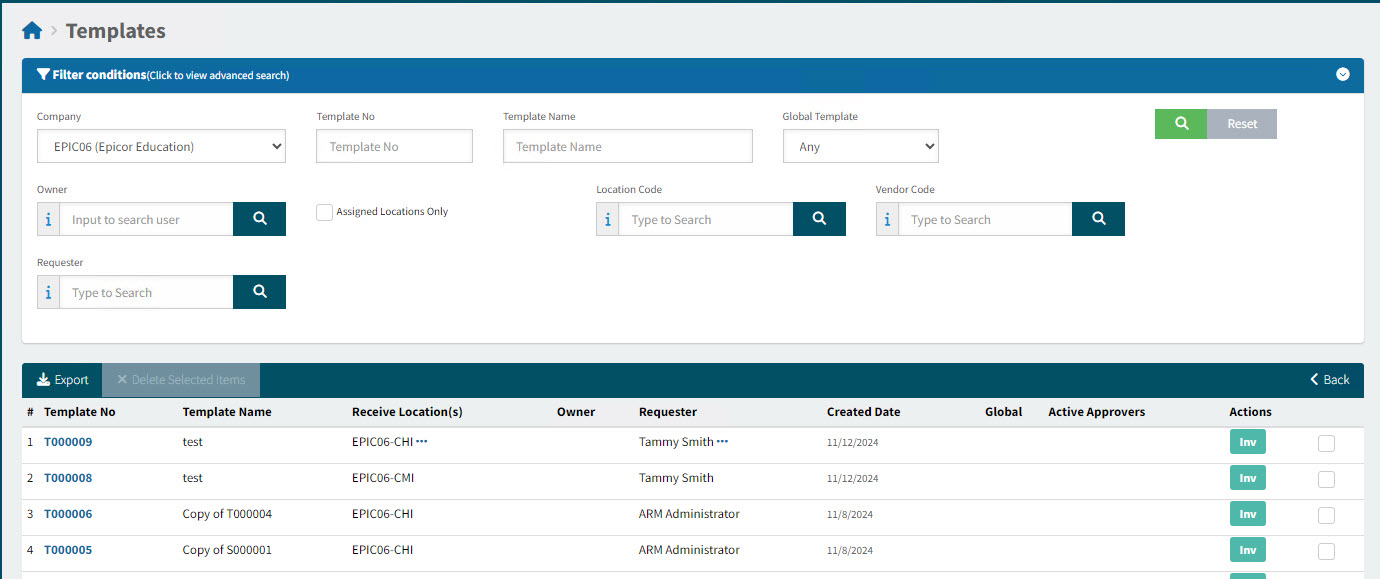
The Templates form displays.
-
Search for the template to use.
-
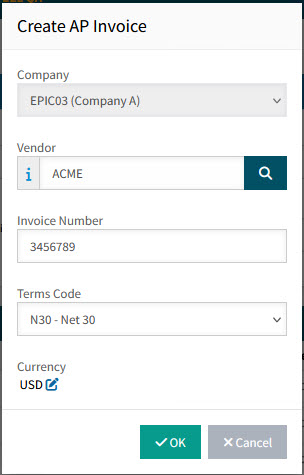
Click the Inv button on the template row you want to use and enter the AP Invoice details in the Create AP Invoice pop-up box.
Details
-
Select a Vendor from the Vendor look-up.
-
Type in the Invoice Number.
-
Select the Terms Code from the drop-down list.
-
Update the Currency, if required.
-
Click OK.
The new AP Invoice is created and opens on the page: AP Invoices [AP Invoice Number].
-
-
Complete the AP Invoice Details before submitting the AP Invoice. See Viewing and Editing an AP Invoice.